What Are AI Agents?
✦ Quick Answer
What Are AI Agents? is an engineering deep-dive on AI & Machine Learning. Discover how AI agents work, what makes them different from standard chatbots, and how modern teams build secure, practical agent systems. This guide details the core principles, architecture setups, practical implementations, and technical solutions for optimizing this workload in production environments.
TL;DR Summary
What You'll Build
A technical project demonstrating modern implementation practices for What Are AI Agents?.
Technologies Used
Key Learning Outcomes
- Understand fundamental design constraints and architectural principles of AI & Machine Learning.
- Implement step-by-step hands-on configurations and structured source code patterns.
- Identify common implementation mistakes, deployment challenges, and production resolutions.
Introduction
AI agents are changing how software is built. Instead of waiting for a user to ask one question and receive one answer, agents can interpret a goal, call tools, inspect results, and continue working until the task is complete. In practice, that means they can browse documents, query databases, send messages, or trigger workflows with far less manual intervention.
Quick Definition
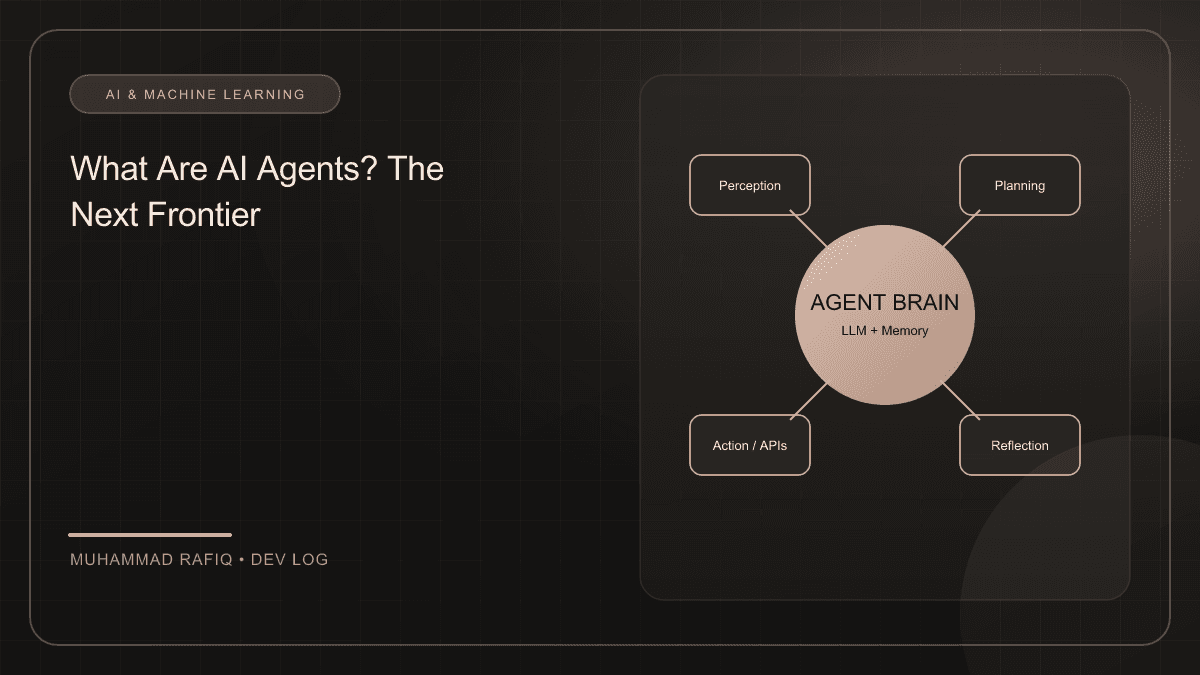
AI agents are goal-driven software systems that combine a large language model with tools, memory, and control logic so they can plan steps, act, observe outcomes, and improve their next move.
What Makes AI Agents Different From Chatbots?
A chatbot usually responds to a prompt in one turn. An AI agent, by contrast, can operate across multiple steps. It decides what action to take next, uses external systems when needed, and can revise its approach if the first attempt fails. That extra loop is what turns a helpful assistant into a semi-autonomous worker.
| Capability | Chatbot | AI Agent |
|---|---|---|
| Primary Goal | Answer a single request | Complete a multi-step objective |
| Tool Use | Limited or none | Uses APIs, databases, and workflows |
| Memory | Mostly session-based | Can maintain state across tasks |
How AI Agents Work
The most common pattern is the ReAct loop: the model reasons about the task, chooses an action, observes the result, and then decides whether to continue. This simple feedback loop makes agents more reliable for real-world work than a single-shot prompt.
- Understand the goal: The agent receives a high-level instruction such as “summarize the latest customer tickets and draft a response.”
- Select a tool: It may search a knowledge base, call an API, or read a file.
- Evaluate the result: It inspects the output and decides whether the job is done or needs another action.
- Repeat until success: The loop continues until the system reaches a final answer or exits safely.
Core Components of an AI Agent
Building a strong agent requires more than a prompt. Teams usually combine several building blocks that give the system a practical execution layer.
- Language model: The reasoning core that interprets instructions and produces decisions.
- Tools: APIs, search endpoints, databases, calculators, or workflow triggers that extend the agent’s reach.
- Memory: Short-term state for the current task and long-term memory for past interactions.
- Guardrails: Validation, permissions, and safety checks that stop the agent from taking dangerous or irrelevant actions.
Common Use Cases for AI Agents
AI agents are already useful in customer support, operations, research, software engineering, and internal productivity. They are strongest when a task involves several steps, multiple data sources, or conditional logic.
- Research assistants that gather information from docs, web pages, and internal notes.
- Support agents that classify issues, fetch account data, and draft replies.
- Developer agents that navigate codebases, run tests, and summarize changes.
- Operations agents that monitor systems, detect anomalies, and recommend next steps.
Best Practices for Building Reliable Agents
The biggest mistake teams make is treating agents like magic black boxes. Reliable systems need structure, visibility, and clear boundaries.
- Start with narrow tasks: A focused workflow is easier to test than an open-ended “do everything” agent.
- Give the agent explicit tools: Avoid vague capabilities and define each tool’s purpose clearly.
- Use human review for risky steps: Approval checkpoints are essential for actions like sending messages or executing commands.
- Track state carefully: Long conversations can get noisy, so summarize or prune context when needed.
FAQ
What is the difference between an AI agent and a workflow?
A workflow is usually a fixed sequence of steps. An AI agent can choose between paths and adapt when conditions change.
Do AI agents need memory?
They do not always need permanent memory, but most useful agents benefit from some form of state management to avoid repeating work or losing context.
Are AI agents safe to deploy?
They become much safer when you add permissions, validation, logging, and approval steps around high-impact actions.
Conclusion
AI agents are best understood as systems that combine reasoning with action. When designed carefully, they can automate repetitive work, improve productivity, and turn static AI assistants into useful digital collaborators.
Frequently Asked Questions
What is the primary topic of What Are AI Agents??
This publication focuses on AI & Machine Learning, specifically detailing Discover how AI agents work, what makes them different from standard chatbots, and how modern teams build secure, practical agent systems with production-grade setups.
What technologies are discussed in this article?
The implementation leverages AI Agents, LLMs, Automation, Architecture, illustrating best practices for configuration, containerization, and layout routing.
What are the typical deployment challenges encountered in this space?
Developers frequently face difficulties around state management, configuration separation, environment variables scaling, and runtime performance constraints.
How does the suggested architecture resolve these issues?
The proposed architecture separates data schemas, implements modular service layers, isolates build contexts using multi-stage scripts, and integrates error fallbacks.
Where can I learn more about these concepts?
Refer to the references section at the bottom of the article for official links to framework documentations, design patterns libraries, and code templates.